
I've recently updated my Nextcloud server to Nextcloud 34 and after that update, I noticed that some of my media files were lacking their previews on web and the Nextcloud Photos app on my phone.
So I knew something was missing and after doing a web search, I came across with many people experiencing the same problem.
But the solution was nowhere to be found. Until I checked the Nextcloud's Admin documentation.
The problem was simple, Nextcloud wasn't configured to render previews for the media files I had on my server. By default Nextcloud only renders previews for some popular image types such as PNG or JPEG but the media format my phone uses to save images wasn't any of them. It was HEIC.
And by default Nextcloud doesn't renders previews for heic files and thats why all the previews I had before were gone after the update. And the solution to that is really simple.
1. Fix Video previews
With the new update, Nextcloud doesn't renders previews for videos by default and you have to enable them in your config.php file yourself. But before changing your configuration file, you need to check to see if FFMPEG is installed on your server.
To do that, simply run the command below.
ffmpeg -version
This command should output something like this:
[batuhan@nextcloud-server ~]$ ffmpeg -version

ffmpeg version 5.1.9 Copyright (c) 2000-2026 the FFmpeg developers
built with gcc 11 (GCC)
configuration:

libavutil      57. 28.100 / 57. 28.100
libavcodec     59. 37.100 / 59. 37.100
libavformat    59. 27.100 / 59. 27.100
libavdevice    59.  7.100 / 59.  7.100
libavfilter     8. 44.100 /  8. 44.100
libswscale      6.  7.100 /  6.  7.100
libswresample   4.  7.100 /  4.  7.100
libpostproc    56.  6.100 / 56.  6.100
If you don't have FFMPEG installed on your server, you need to install it first.
After installing and verifying FFMPEG works, you need to edit the config.php file. If you're running a RHEL based distro like CentOS, AlmaLinux or Rocky Linux you need to edit your file as the nginx user or apache user depending on your choice of webserver. Otherwise SELinux may prevent your webserver from reading config.php file.
But if you're running Debian or Ubuntu, you can just edit the file as root.
sudo $EDITOR <location_of_nextcloud_server>/config/config.php
For RHEL based distros, if you're using Nginx the user will be nginx else it'll be apache.
sudo -u <user> $EDITOR <location_of_nextcloud_server>/config/config.php
After opening the file with your preferred editor, find the array enabledPreviewProviders.
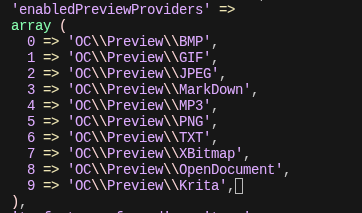
After that add those lines inside the array and make sure the numbering is correct.
10 => 'OC\\Preview\\WebP',
11 => 'OC\\Preview\\Movie',
12 => 'OC\\Preview\\MP4',
And it's done!
2. Fix HEIC previews
The fix for HEIC files are much simpler than videos. All you need to do is, adding one more line inside the enabledPreviewProviders array inside config.php file.
Just like above, open your config.php file with the right command below.
- Debian based:
bash sudo $EDITOR <location_of_nextcloud_server>/config/config.php - RHEL based:
bash
sudo -u <user> $EDITOR <location_of_nextcloud_server>/config/config.php
After that find the enabledPreviewProviders array and add the line below. And make sure the numbering is correct.
13 => `OC\\Preview\\HEIC`
And that's it!
This is really a simple fix hidden inside the Nextcloud Documentation but because it's a bit hard to find it, I decided to write my own. Hope it helps!
For more information, you can check out the official documentation page below.
Reply via E-mail
Thank You!
30.06.2026 - 002/100